Implementing CLAUDE.md and Agent Skills In Your Repository
A practical guide to the 3-tier documentation architecture that makes AI coding agents work: root CLAUDE.md, task-specific skills, and agent guides with progressive disclosure.
Your Rules File Is The Product
In my Early 2026 Agentic Coding Update, I talked about the loop: manager agents, coding agents, PRIME_DIRECTIVEs, and review gates.
That post covered how to run the loop. This one covers the thing that makes the loop actually work: the documentation architecture.
Every session with Claude Code or OpenCode starts stateless. No memory of your conventions. No knowledge of your test commands. No awareness that you use bun instead of npm or that migrations go through Alembic and not raw SQL.
The only thing that reliably onboards each new session is your rules file. CLAUDE.md for Claude Code. AGENTS.md for OpenCode. Whatever you put there shapes every decision the agent makes.
Most repos either have nothing, or they have a bloated auto-generated file that the model quietly ignores. Both fail for the same reason: the agent does not have the right context at the right time.
This post is the practical guide to fixing that.
The Core Problem: Context At The Wrong Time
The official Claude best practices for agent skills make this clear: the context window is a shared public good. Your CLAUDE.md competes with the system prompt, conversation history, and every other piece of context the model needs.
HumanLayer's guide on writing a good CLAUDE.md puts it more bluntly: Claude often deprioritizes CLAUDE.md content entirely. The system injects a reminder saying the context "may or may not be relevant." The more instructions you include that are not universally applicable, the more likely the model dismisses the whole file.
This means you cannot solve the problem by writing a bigger rules file. You solve it with architecture.
The 3-Tier Architecture
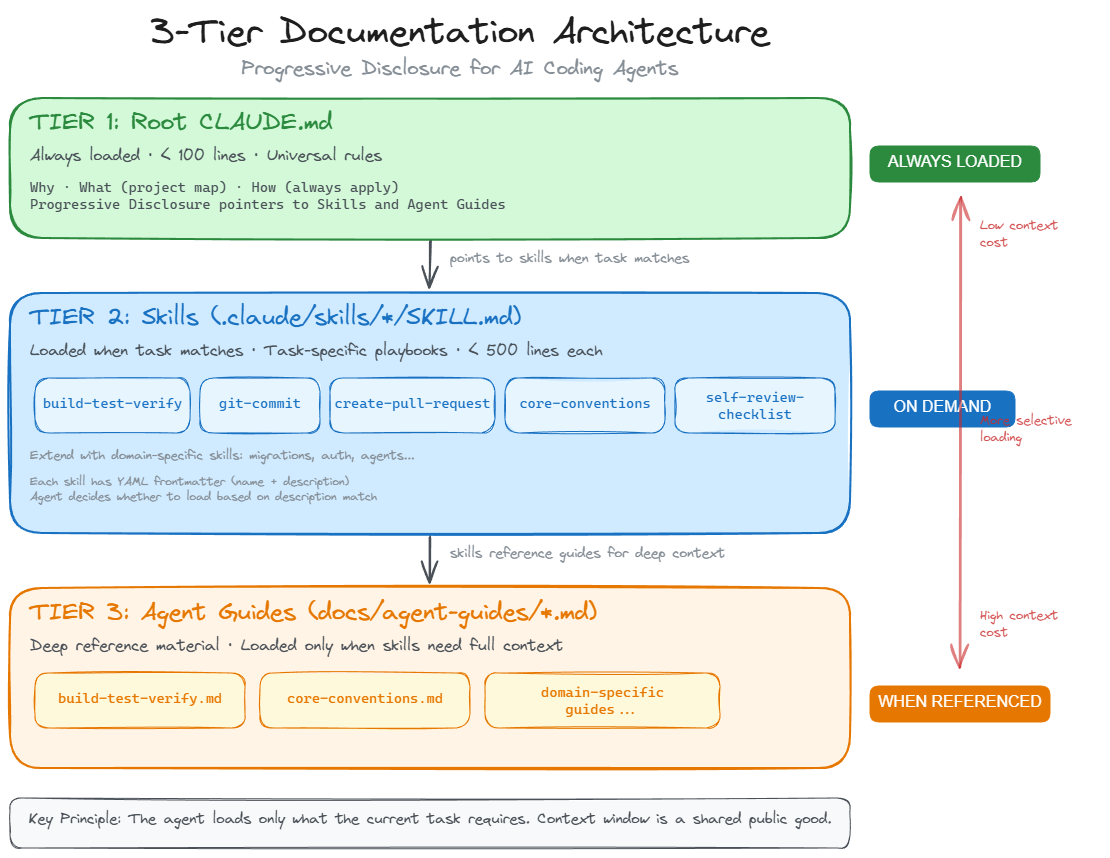
After running this pattern across multiple production repos, I have landed on three tiers:
Tier 1: Root CLAUDE.md - Universal rules that apply to every task. Under 100 lines. Loaded automatically every session.
Tier 2: Skills (.claude/skills/name/SKILL.md) - Task-specific behavior loaded on demand. The agent reads a skill only when the task matches. Think of these as specialized playbooks: one for commits, one for PRs, one for migrations.
Tier 3: Agent Guides (docs/agent-guides/name.md) - Deep reference material. Build commands, architecture docs, convention details. Skills point to these. The agent reads them only when it needs the full picture.
The key principle is progressive disclosure. The root file is a table of contents. Skills are chapters. Agent guides are appendices. The agent loads only what the current task requires.
your-repo/
  CLAUDE.md                          # Tier 1: Universal (< 100 lines)
  .claude/
    skills/
      build-test-verify/SKILL.md     # Tier 2: On-demand task playbooks
      create-pull-request/SKILL.md
      git-commit/SKILL.md
      core-conventions/SKILL.md
      self-review-checklist/SKILL.md
  docs/
    agent-guides/
      build-test-verify.md           # Tier 3: Deep reference
      core-conventions.md
  backend/CLAUDE.md                  # Directory-level overrides
  frontend/CLAUDE.md
Step 1: Audit What You Have
Before writing anything, inventory what already exists. Most repos have some combination of:
- An existing
AGENTS.mdorCLAUDE.md(possibly auto-generated) - A
README.mdwith build/test/run instructions - CI workflow files that encode the real validation commands
- Scattered docs about architecture or conventions
Do not throw any of this away. You are going to absorb it into the right tier.
Map each piece of existing documentation to where it belongs:
| Existing Content | Target Tier |
|---|---|
| "Use bun, not npm" | Tier 1 (root CLAUDE.md) |
| "Run pytest -x for backend tests" | Tier 2 (build-test-verify skill) or Tier 3 (agent guide) |
| "Our agents follow this directory contract..." | Tier 2 (domain-specific skill) |
| "Here is the full project directory tree" | Tier 3 (project-map agent guide) |
| "Always use Conventional Commits" | Tier 2 (git-commit skill) |
The rule: if it applies to every task, it goes in Tier 1. If it applies only when doing a specific kind of work, it goes in Tier 2 or 3.
Step 2: Write the Root CLAUDE.md
This is the highest-leverage file in your entire repo for AI-assisted development. Every token competes for attention.
Use the Why / What / How / Progressive Disclosure structure:
# Project Name Agent Guide

Use this file as the default onboarding context for this repo.

## Why

Brief description of what this project is and what matters.
One to three sentences. No filler.

## What (project map)

- `frontend/` - React app (Vite, Bun)
- `backend/` - FastAPI + Pydantic AI
- `docs/agent-guides/` - task-specific guidance loaded on demand

Read `docs/agent-guides/project-map.md` for the full map.

## How (always apply)

- Use existing project patterns before introducing new abstractions.
- Backend: use `uv` for Python deps, `ruff` for linting.
- Frontend: use `bun` for deps and scripts.
- Do not hardcode API URLs.
- Validate changes with the smallest relevant command set first.

## Progressive Disclosure

Do not load every guide for every task. Read only what is relevant:

- Build/test/lint: `docs/agent-guides/build-test-verify.md`
- Conventions: `docs/agent-guides/core-conventions.md`
- Migrations: `docs/agent-guides/alembic-migrations.md`

Use skills in `.claude/skills/` for task-specific behavior:

- Core: `build-test-verify`, `core-conventions`
- Workflow: `create-pull-request`, `git-commit`, `self-review-checklist`

## Local Overrides

Directory-level `CLAUDE.md` files may add stricter rules.
Apply the nearest file in addition to this one.

## PR and Branching

Use a feature branch. Never push directly to `main`.
Use the `create-pull-request` skill for standards.
Target: under 100 lines. HumanLayer keeps theirs under 60. Anthropic recommends under 300 but less is better. In my experience, 60 to 100 lines is the sweet spot for a real production repo.
What to leave out of Tier 1:
- Detailed build commands (belongs in a skill or agent guide)
- Code style rules (use a linter, not the LLM)
- Architecture deep dives (belongs in agent guides)
- Anything that only applies to one directory (use local overrides)
Step 3: Write Your Skills
Skills are the biggest upgrade over a flat CLAUDE.md. They give you task-specific behavior that loads only when relevant.
Every skill needs YAML frontmatter with name and description. The description is critical because the agent uses it to decide whether to load the skill.
---
name: build-test-verify
description: Run lint, test, and build verification commands
  for the project. Use when validating changes, running tests,
  or checking builds.
---
Start with these five skills. They cover the most common AI-assisted workflows in any repo:
- build-test-verify - Your lint/test/build commands, organized by stack. The agent loads this whenever it needs to validate work.
- git-commit - Your commit message format, branch naming, what to check before committing. Prevents the agent from writing vague commit messages.
- create-pull-request - PR title format, description template, base branch, what checks must pass. Prevents sloppy PRs.
- core-conventions - Code style, import ordering, naming patterns, file organization. Only loaded when writing or reviewing code.
- self-review-checklist - Quality gate the agent runs before finishing work. Catches convention drift and missing tests.
Then add domain-specific skills for what makes your repo unique. For example:
- A repo with database migrations needs an
alembic-migrationsordrizzle-migrationsskill - A repo with AI agents needs a skill that codifies the agent creation contract
- A repo with a complex auth system needs a skill for authorization patterns
Skill authoring principles:
- Keep
SKILL.mdunder 500 lines (Anthropic recommendation). Under 150 is better for most skills. - Point to agent guides for deep content. The skill says what to do. The agent guide explains how it all works.
- Assume Claude is smart. Do not explain what Python is. Do not explain what a PR is. Only add context Claude genuinely lacks: your specific commands, your specific conventions, your specific architecture.
- Set the right degree of freedom. Fragile operations (migrations, deployments) need exact commands. Flexible operations (code review, refactoring) need principles and heuristics.
Step 4: Write Agent Guides
Agent guides live in docs/agent-guides/ and serve as the deep reference layer. Skills point to them. The agent reads them only when it needs the full context.
Minimum set:
- build-test-verify.md - Every lint, test, and build command with expected output. Include Docker and CI commands if relevant.
- core-conventions.md - The expanded version of your code conventions. Import patterns, naming rules, file organization, error handling patterns.
Add more as complexity demands. Migration workflows, API contracts, auth patterns, streaming protocols. Whatever would take a new human engineer more than five minutes to figure out from the code alone.
Do not try to maintain a project-map or directory tree guide. These go stale immediately and the maintenance cost is not worth it. The agent can explore the filesystem directly when it needs to understand structure.
Step 5: Add Directory-Level Overrides
If your repo has distinct subsystems (like a backend/ and frontend/), add a CLAUDE.md in each directory with rules that only apply there.
# Backend Rules

Apply the root `CLAUDE.md` first, then this file.

## Non-Negotiable

- All database changes go through Alembic migrations. No raw DDL.
- Use `uv` for all Python dependency management.
- All database operations use async SQLAlchemy sessions.
- Auth is MSAL-based. Do not introduce alternative auth patterns.
Keep these short. 20 to 30 lines. They exist to prevent mistakes in a specific area, not to repeat what is already in the root file.
What Not To Do
Do not auto-generate your CLAUDE.md. Running /init produces generic output that wastes your highest-leverage file. Write it yourself.
Do not use CLAUDE.md as a linter. HumanLayer is right about this: style rules in CLAUDE.md are expensive and unreliable. Use Ruff, Biome, ESLint, or Prettier. Set up a pre-commit hook or a Claude Code stop hook. LLMs are the wrong tool for deterministic formatting.
Do not duplicate content across tiers. A skill should point to an agent guide, not copy its content. If the same instructions exist in two places, they will drift apart.
Do not stuff everything into Tier 1. Every line in your root CLAUDE.md competes for attention. If it does not apply to literally every task, push it down to a skill or agent guide.
Do not create skills for things that do not have enough complexity. A single CI workflow file does not need a github-actions skill. A simple UI library does not need a frontend-design skill. Skill count should match actual decision surface, not aspiration.
Skills Are Powerful, But Not Automatically Safe
One place I look for skill ideas is skills.sh, Vercel's skills leaderboard. Discovery is useful. Discovery is not trust.
Skills are just markdown files, but they shape agent behavior in real ways. Treat every installed skill like executable influence over your workflow. A few failure modes are common:
Skills can quietly bias recommendations toward products and services. A "database optimization" skill might steer every recommendation toward a specific managed service. You would not notice unless you read the raw markdown.
Skills can contain dangerous instructions. Exfiltrating secrets with curl, writing to unexpected paths, or running destructive commands. The skill does not need to be malicious on purpose. A poorly scoped skill can still cause real damage.
Skills can burn context when they are no longer useful. Install-heavy skills linger in your .claude/skills/ directory and get loaded into sessions where they add nothing. Every loaded skill competes for context window space with the work you actually need done.
Skills can conflict with your codebase conventions. A generic "React best practices" skill might recommend patterns that contradict your existing architecture. When skills and repo conventions disagree, the agent gets confused and output quality drops.
I have had the best results by taking inspiration from public skills, then rewriting them for my own repo standards and review gates.
Safe Skill Adoption Checklist
- Read the raw
SKILL.mdyourself before enabling it. - Ask an agent to audit the skill for security risks and exfiltration patterns.
- Check that the skill matches your repo's actual conventions and architecture.
- Restrict permissions so the skill cannot overreach.
- Remove or disable stale skills that no longer earn their context cost.
Cross-Tool Compatibility
This architecture is not Claude-only. OpenCode reads .agents/skills/ and AGENTS.md but also supports Claude-compatible fallbacks. I keep .claude/skills/ as the canonical location and it works across both tools.
If you use OpenCode, you can add a compatibility note to your skill frontmatter:
---
name: build-test-verify
description: Run lint, test, and build verification.
compatibility: claude-code, opencode
---
Other tools like Cursor and Windsurf have their own rules file conventions. The agent guide layer (docs/agent-guides/) works with anything because it is just markdown in a standard location.
The Payoff
After implementing this across multiple repos, the difference is measurable:
Before: The agent guesses at test commands, uses the wrong package manager, creates PRs with no description format, writes commit messages that say "update code."
After: The agent runs the right commands, follows your conventions, creates PRs that match your team's standards, and loads deep context only when the task actually needs it.
The root CLAUDE.md is the highest-leverage file in your repo for AI-assisted development. The skills and agent guides turn one good file into a system. Treat it like infrastructure, not documentation.
Getting Started Checklist
If you want to add this to your repo today:
- Audit - Inventory your existing docs, README, CI files, and any
AGENTS.md - Root CLAUDE.md - Write the Why / What / How / Progressive Disclosure structure. Under 100 lines.
- Five starter skills -
build-test-verify,git-commit,create-pull-request,core-conventions,self-review-checklist - Two starter agent guides -
build-test-verify,core-conventions - Directory overrides - Add
CLAUDE.mdin directories with unique constraints - Test it - Start a fresh Claude Code or OpenCode session and try a real task. Watch what the agent loads and where it stumbles. Iterate.
Do not try to get it perfect on the first pass. The best CLAUDE.md files are iterated over weeks based on watching real agent behavior.
The best source of improvements is code review. Every comment a reviewer leaves on an AI-assisted PR is a signal that the agent lacked context. Wrong import pattern? Add it to core-conventions. Missed a test command? Update build-test-verify. Used the wrong migration tool? Add a line to the directory override. I treat every review comment as an opportunity to add a new rule, a new checklist item, a new guardrail. Over time, the same mistakes stop appearing because the agent has the context it was missing. These files are living documents, not write-once artifacts.
Further Reading
- Claude Agent Skills Best Practices - The official guide on writing effective skills. Covers progressive disclosure, YAML frontmatter, and the checklist.
- Writing a Good CLAUDE.md (HumanLayer) - Why less is more, and why your
CLAUDE.mdshould not be a linter. - Early 2026 Agentic Coding Update - My broader agentic workflow post covering the manager/coding agent loop, PRIME_DIRECTIVEs, and skills safety.